Branded Exports
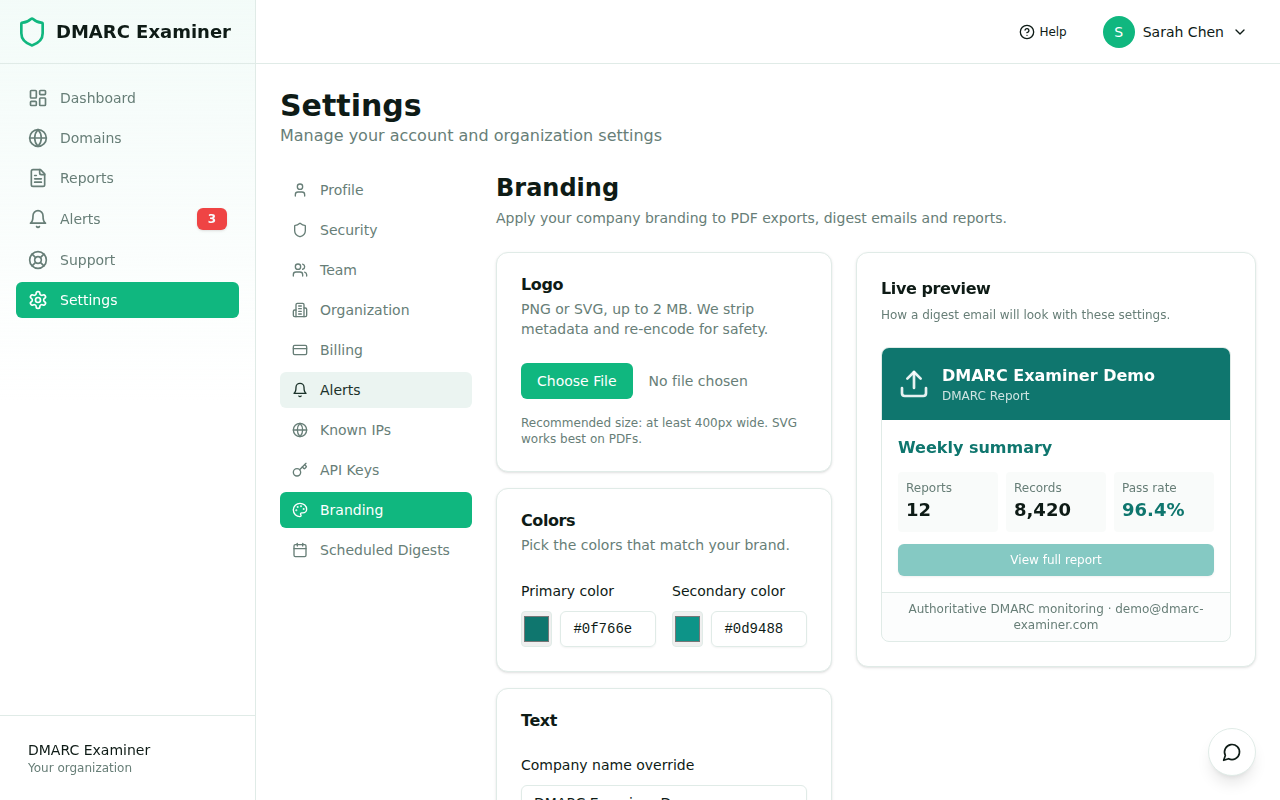
Branded Exports replace our default colors and product name with yours in the artifacts your organization shares with the outside world: PDF exports of reports and dashboards, and scheduled digest emails. The product UI itself is unaffected — this is only about the things you hand off (or that we hand off on your behalf).
Plan: Branded Exports are available on the Ultimate plan (feature flag
whiteLabelReports).
What gets branded
| Artifact | What changes |
|---|---|
| Scheduled digest emails | Header logo, primary color on title bar and CTA buttons, footer text. |
| CSV exports | Header line carrying your company name (replaces "DMARC Examiner"). |
| Standalone PDF exports | Cover, header band, brand colors, footer. Available on Ultimate; rendered by the same Gotenberg engine used for digests. |
| Team invitation emails | Same brand color and company name as digests. |
Configuring your brand
Go to Settings → Branding. The page has four sections:
- Logo — upload a PNG or SVG up to 2 MB. We re-encode the bytes for safety (strip EXIF for PNG, sanitize
<script>for SVG) and store the result in a private S3 bucket. Recommended dimensions are around 400×100 px; we cap any single dimension at 2000 px. - Brand colors — primary and secondary hex values. The form refuses any primary color whose contrast against white is below 3.0 (WCAG AA for large text) so the text in your branded PDFs remains legible.
- Identity overrides — optional override for company name and footer text. Leave blank to use your organization name and the default footer.
- Live preview — a side-by-side render showing how a digest email will look with the current settings. Updates in real time as you edit.
Sending a test email
Once you're happy with the preview, click Send test email. We render the digest template with your branding and send it to your own email address. The endpoint is rate-limited to 3 requests per hour to avoid mailbox flooding.
Per-field fallback
Branding is granular: every field you leave blank falls back to the product default at render time. This means you can roll out branding incrementally — for example, just set the primary color first, see how it looks in a real digest, then add the logo.
If your plan loses access to whiteLabelReports (e.g. on downgrade), we keep the configuration row but ignore it at render time. Re-upgrading restores your previous branding automatically — no need to re-upload anything.
Frequently asked questions
Where is my logo stored?
In a private AWS S3 bucket in the eu-south-2 region, with Server-Side Encryption (SSE-S3) and Block Public Access enabled. We never expose a public URL — emails embed the logo as a CID attachment, and the in-app preview proxies the binary through an authenticated endpoint.
Can a super-admin pre-configure my branding? Yes. Our support team can apply branding on your behalf through a backoffice endpoint, useful for trial accounts and onboarding assistance.
Does branding affect alert webhooks? No — webhook payloads are plain JSON consumed by your own systems and don't carry visual branding.