Verificación DNS
DNS verification confirms that you own the domain and that its DMARC record is configured to send reports to DMARC Examiner.
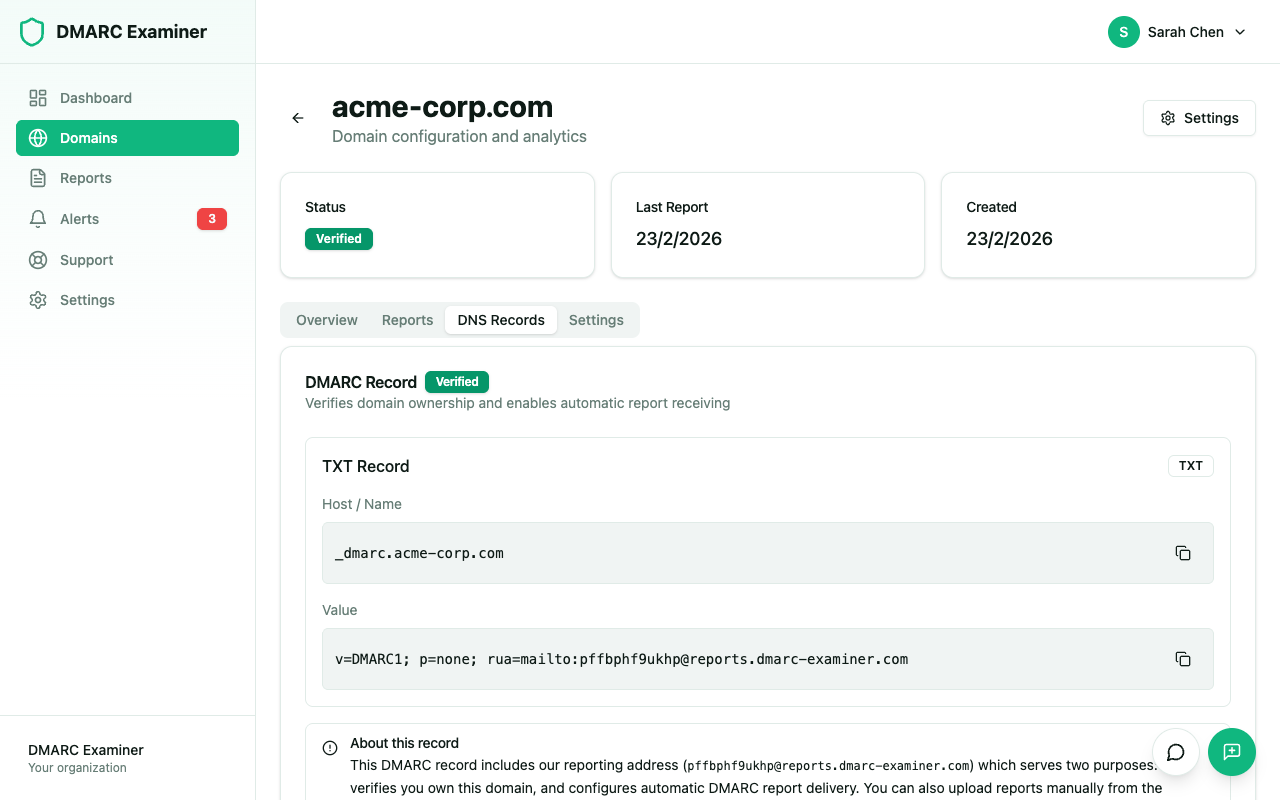
What to add
When you add a domain, DMARC Examiner provides you with a TXT record value to add at _dmarc.yourdomain.com. This record includes:
- DMARC version tag —
v=DMARC1 - Policy — The
p=field with a valid value (none, quarantine, or reject) - RUA address — The
rua=field pointing to the DMARC Examiner reporting address
Add this TXT record through your DNS provider's management panel.
How to verify
From the Domains section, click on the domain you want to verify and then click Verify DNS. The system checks for the TXT record at _dmarc.yourdomain.com and validates its contents. The result appears within a few seconds.
The system also performs automatic periodic checks, so if you have just added the DNS record you can wait for propagation to complete and the verification will happen on its own.
Verification outcomes
After a verification check, the domain will be in one of these states:
| State | Description |
|---|---|
| Verified | The record is correct and DMARC reports will be received |
| Pending | The record has not been detected yet; DNS propagation may still be in progress |
| Failed | The required TXT record was not found or its contents were incorrect |
Troubleshooting
If the verification fails, check the following:
- That the record is at
_dmarc.yourdomain.com(not at the rootyourdomain.com) - That you copied the RUA address from the platform exactly as provided
- That you waited at least 30 minutes after the DNS change for propagation
- That there is no conflicting or duplicate
_dmarcTXT record for the domain